> ## Documentation Index
> Fetch the complete documentation index at: https://superwhisper.com/docs/llms.txt
> Use this file to discover all available pages before exploring further.
# Create Your First Mode
> Let's create your first mode and pick your models along the way.
Modes help you customize communication styles across apps and use cases. Every mode includes the voice model that transcribes, and a language model and prompt that shapes the result.
## Create a Message mode
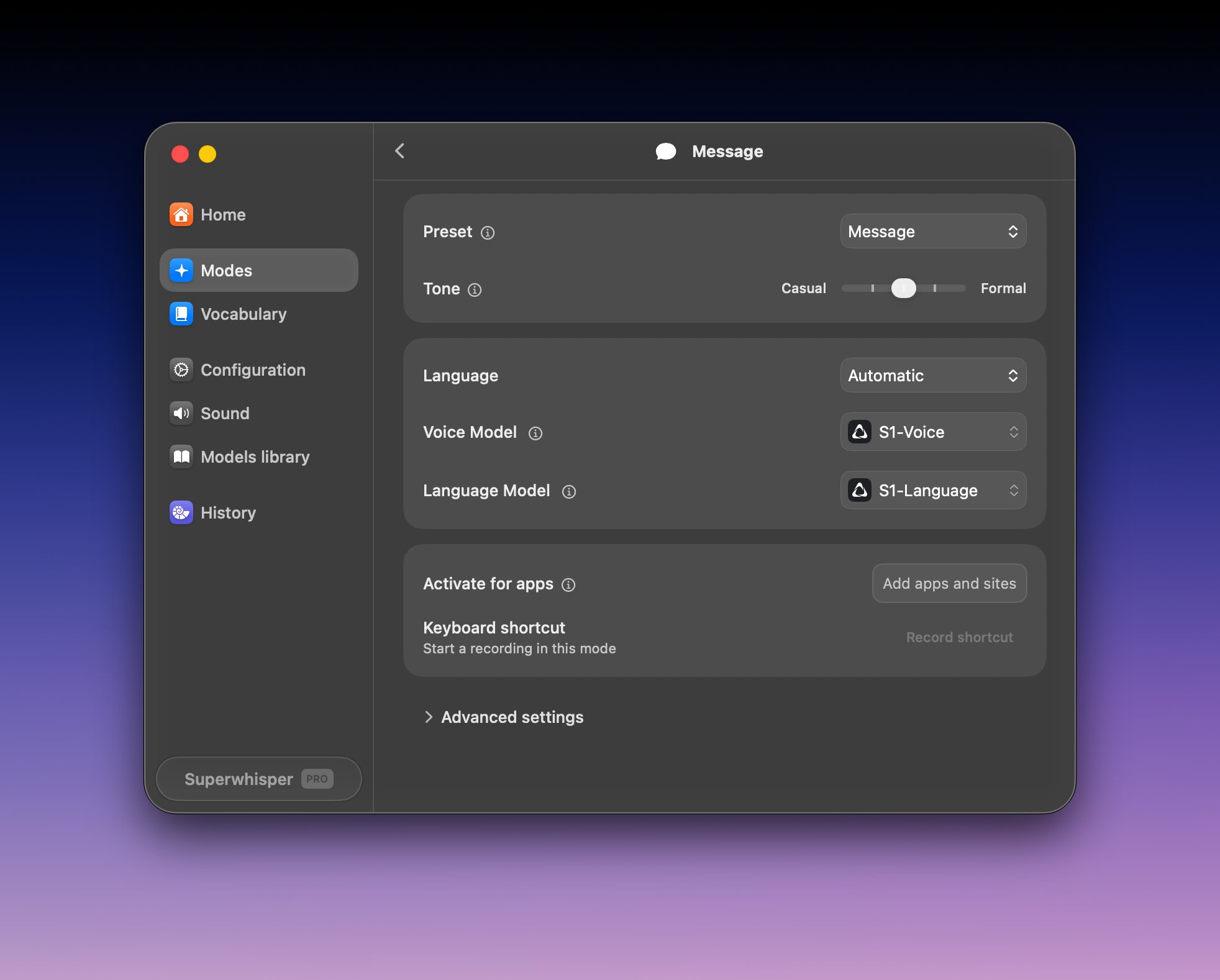
**Message** mode turns your dictation into a ready-to-send message, with a tone slider from casual to formal.
Open Superwhisper's settings and click **Modes** in the sidebar.
Click **+ Create mode** and select the **Message** preset. Click the mode's name to rename it.
Two setups work well:
Keep the defaults: **S1-Voice** for transcription and **S1-Language** for formatting. Nothing to download.
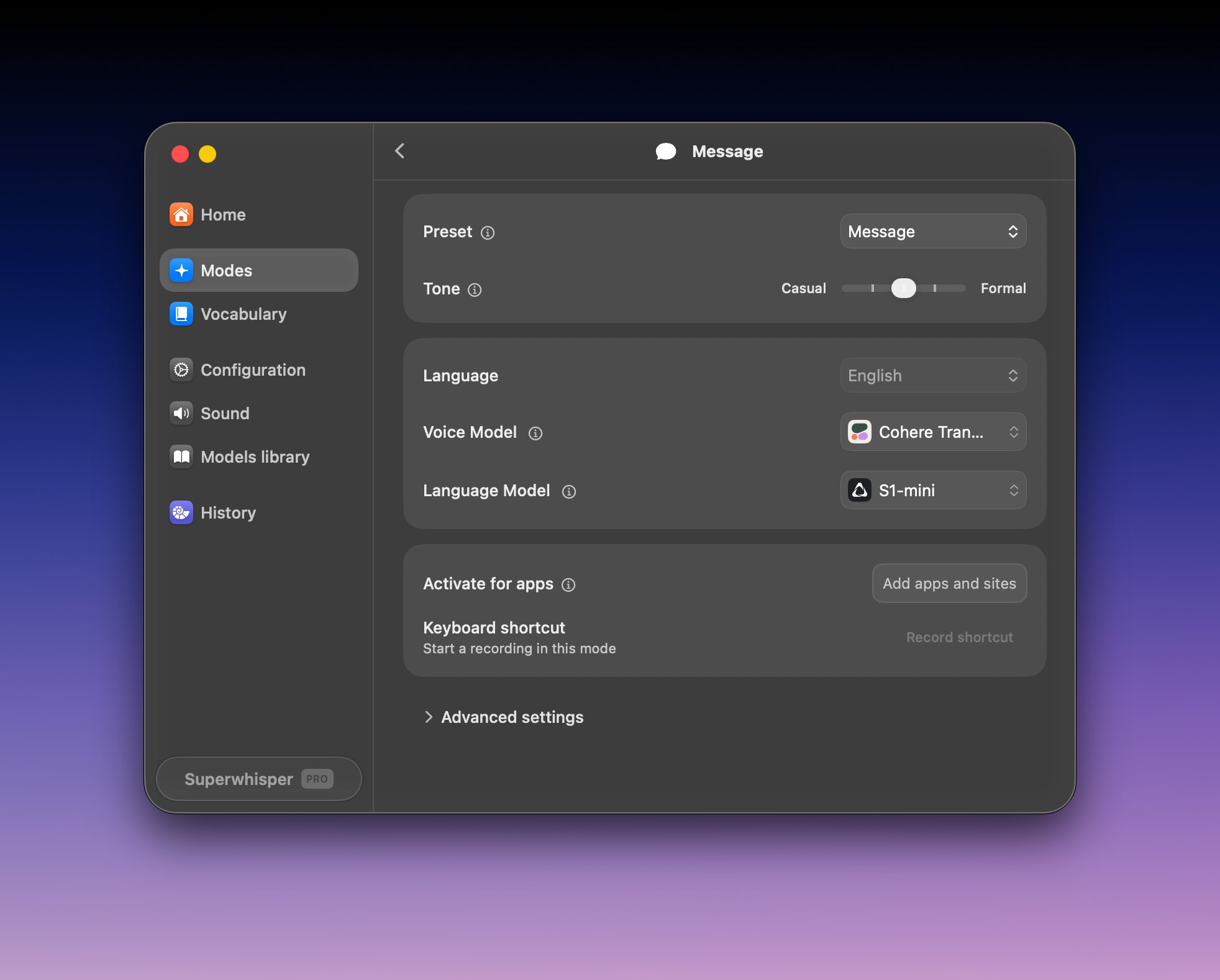
 Set **Voice Model** to **Cohere Transcribe** and **Language Model** to **S1-mini**. Both run on your device — nothing you dictate leaves it. First use downloads the models (Cohere Transcribe is 1.3 GB).
 Click into a text field, press **⌥ Space** (Option + Space), and speak. Superwhisper records with your active mode — the one marked with a green dot in the Modes list. Press **⌥ ⇧ K** (Option + Shift + K) to switch modes.
## Explore more models
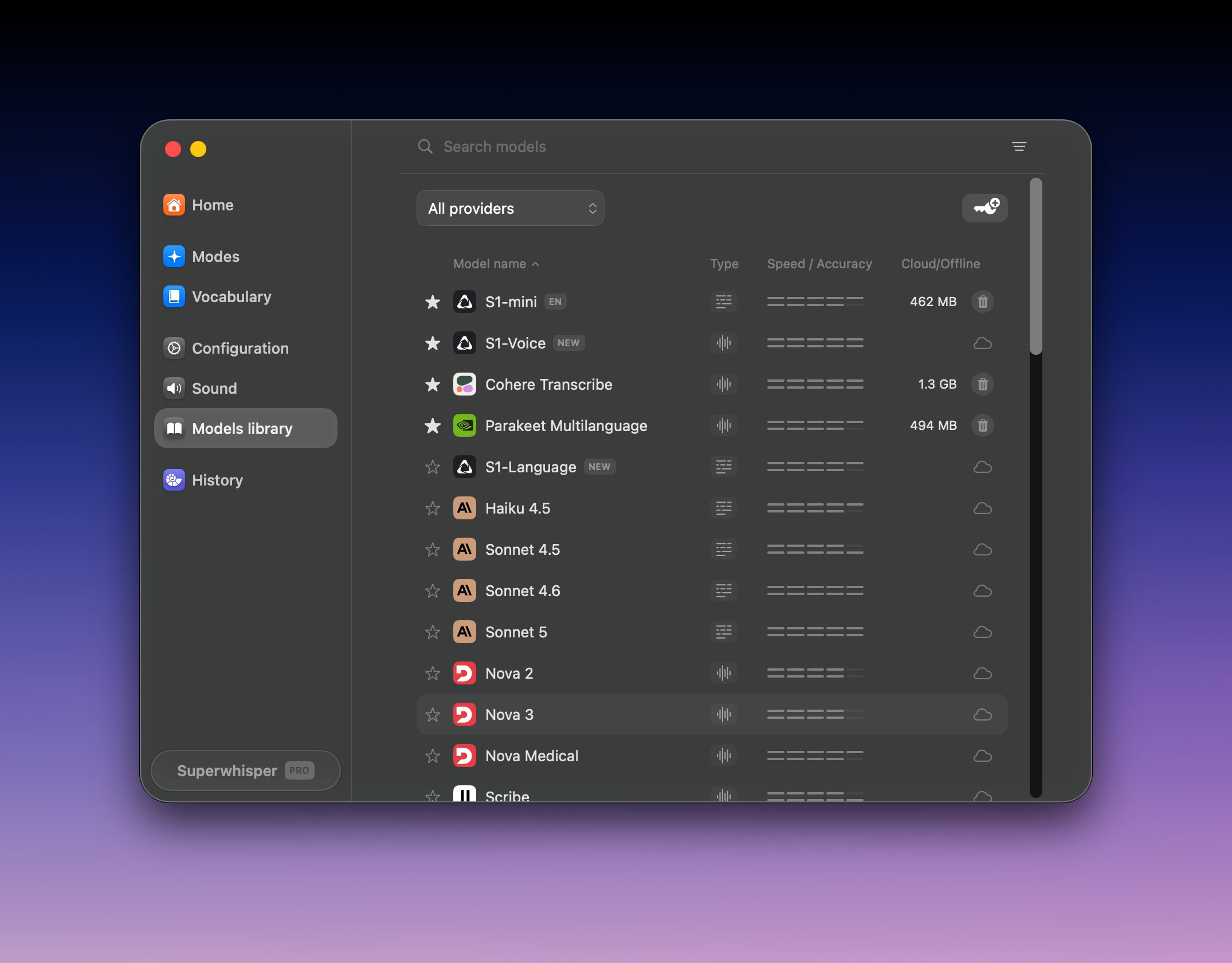
Open **Settings → Models library** to browse every model, download local ones, and remove ones you no longer use.
Click into a text field, press **⌥ Space** (Option + Space), and speak. Superwhisper records with your active mode — the one marked with a green dot in the Modes list. Press **⌥ ⇧ K** (Option + Shift + K) to switch modes.
## Explore more models
Open **Settings → Models library** to browse every model, download local ones, and remove ones you no longer use.
 ### Cloud or local?
| | Cloud | Local |
| :---------- | :---------------------------------------- | :---------------------------------------------- |
| Setup | None — works immediately | One-time download (75 MB – 3 GB) |
| Privacy | Audio processed in the cloud (ZDR policy) | Audio never leaves your device |
| Offline use | Requires internet | Works offline |
| Speed | Fast on any hardware | Fast on modern hardware |
| Best for | Most users, older machines | Sensitive work, travel, privacy-conscious users |
### Our picks
| Model | Runs | Size | Why pick it |
| :------------------------- | :---- | :---------- | :---------------------------------------------------------------------------------------------- |
| **S1-Voice** | Cloud | No download | The most accurate model we ship (6.8% word error rate) |
| **Cohere Transcribe** | Local | 1.3 GB | The most accurate local model (8.4% word error rate) — our first pick for on-device |
| **Parakeet Multilanguage** | Local | 494 MB | The fastest on Apple silicon, and the only local option for Windows ARM. Best for Multilingual. |
| **Whisper Large V3 Turbo** | Local | 1.6 GB | The fastest on some Windows machines |
Numbers come from [our public benchmarks](https://superwhisper.com/benchmarks).
**Free models: Standard, Nano, and Fast** are free and small — great for quick notes.
**On Windows:** Cohere Transcribe and Whisper Large V3 Turbo run on your GPU through Vulkan, which Windows ARM (Snapdragon) devices don't support yet. On ARM, use Parakeet Multilanguage or a cloud model. Details in [Windows requirements](/docs/get-started/windows#requirements).
For every model's languages, speed, accuracy, and size, see [Voice models](/docs/models/voice) and [Language models](/docs/models/language).
## Next step
Modes decide what happens to your transcription — plain text, a formatted message, an email, or a custom transformation.
### Cloud or local?
| | Cloud | Local |
| :---------- | :---------------------------------------- | :---------------------------------------------- |
| Setup | None — works immediately | One-time download (75 MB – 3 GB) |
| Privacy | Audio processed in the cloud (ZDR policy) | Audio never leaves your device |
| Offline use | Requires internet | Works offline |
| Speed | Fast on any hardware | Fast on modern hardware |
| Best for | Most users, older machines | Sensitive work, travel, privacy-conscious users |
### Our picks
| Model | Runs | Size | Why pick it |
| :------------------------- | :---- | :---------- | :---------------------------------------------------------------------------------------------- |
| **S1-Voice** | Cloud | No download | The most accurate model we ship (6.8% word error rate) |
| **Cohere Transcribe** | Local | 1.3 GB | The most accurate local model (8.4% word error rate) — our first pick for on-device |
| **Parakeet Multilanguage** | Local | 494 MB | The fastest on Apple silicon, and the only local option for Windows ARM. Best for Multilingual. |
| **Whisper Large V3 Turbo** | Local | 1.6 GB | The fastest on some Windows machines |
Numbers come from [our public benchmarks](https://superwhisper.com/benchmarks).
**Free models: Standard, Nano, and Fast** are free and small — great for quick notes.
**On Windows:** Cohere Transcribe and Whisper Large V3 Turbo run on your GPU through Vulkan, which Windows ARM (Snapdragon) devices don't support yet. On ARM, use Parakeet Multilanguage or a cloud model. Details in [Windows requirements](/docs/get-started/windows#requirements).
For every model's languages, speed, accuracy, and size, see [Voice models](/docs/models/voice) and [Language models](/docs/models/language).
## Next step
Modes decide what happens to your transcription — plain text, a formatted message, an email, or a custom transformation.