> ## Documentation Index
> Fetch the complete documentation index at: https://superwhisper.com/docs/llms.txt
> Use this file to discover all available pages before exploring further.
# CLI & MCP Server
> Search, read, and export your Superwhisper history from the terminal. Run the CLI as an MCP server to give AI assistants access.
The `superwhisper` CLI gives you terminal access to your local transcription history, vocabulary, and snippets. It can also run as an MCP (Model Context Protocol) server, so AI assistants like Claude Code can search and read your dictations.
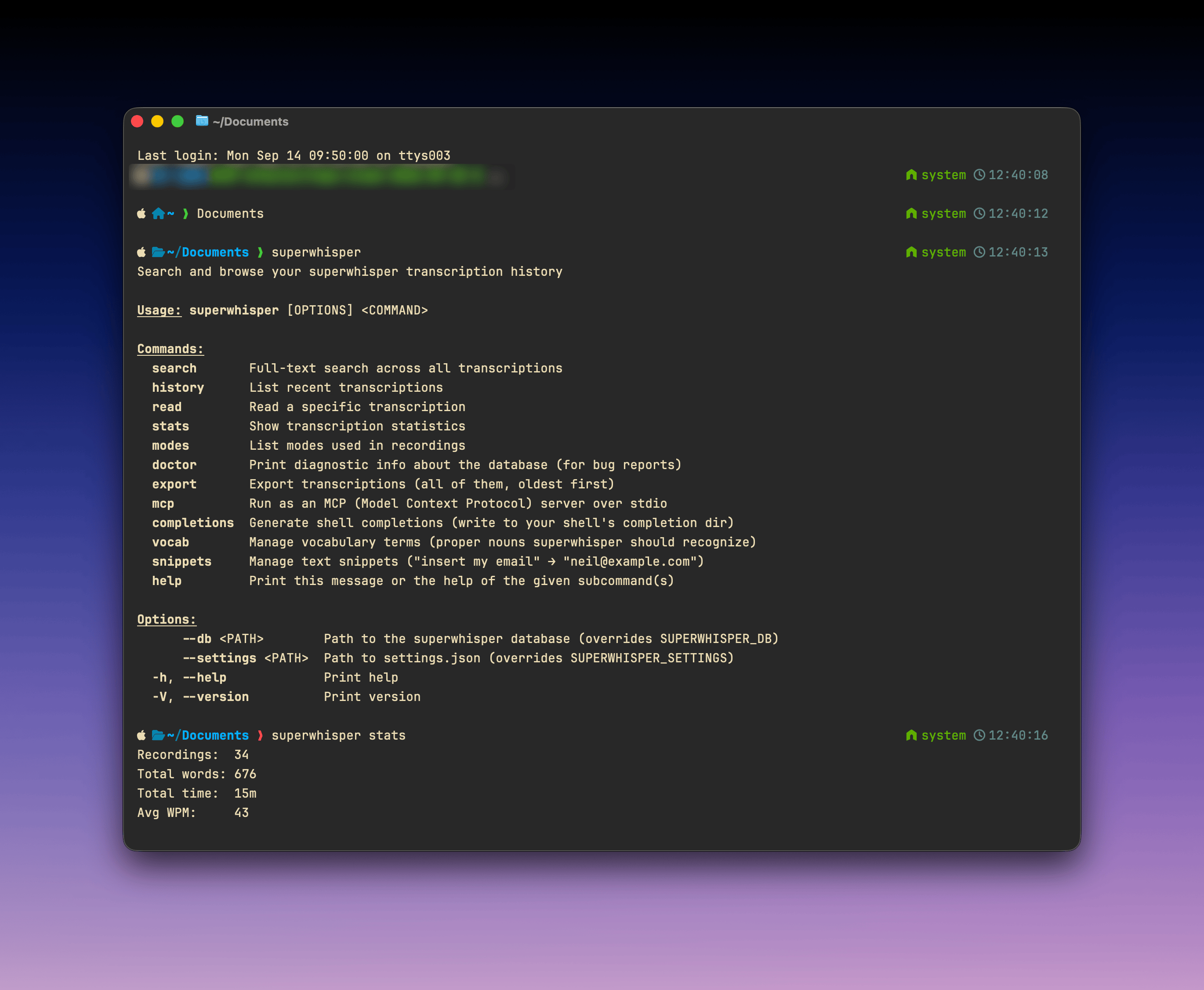 The CLI is available on macOS and reads the same local database as the app; its commands run entirely on your device. If you connect an AI assistant over MCP, the transcripts it queries are sent to that assistant and handled under its own model and data settings.
## Install
```bash theme={null}
curl -fsSL https://superwhisper.com/install-cli.sh | bash
```
The script installs the latest release to `/usr/local/bin`, or to `~/.local/bin` if that isn't writable. Binaries and checksums are published at [superultrainc/superwhisper-cli-release](https://github.com/superultrainc/superwhisper-cli-release).
## Commands
| Command | What it does |
| ---------------- | ----------------------------------------------------------------------------------------------------------------------------------------------------- |
| `search ` | Full-text search across all transcriptions. Supports FTS5 syntax: `AND`, `OR`, `NOT`, `"phrase"`, `prefix*` |
| `history` | List recent transcriptions. Filter with `--mode`, `--since`, `--before` |
| `read [ID]` | Read one transcription (the latest if no ID). `--raw` shows the transcription before AI processing |
| `stats` | Transcription statistics |
| `modes` | List modes used in your recordings, with counts |
| `export` | Export everything, oldest first, as `jsonl` or `markdown` |
| `vocab` | List, add, or remove [vocabulary](/docs/get-started/interface-vocabulary) terms |
| `snippets` | List, set, or remove [replacements](/docs/get-started/interface-vocabulary#replacements): the same From → To pairs as **Settings → Vocabulary** in the app |
| `completions` | Generate shell completions |
| `doctor` | Diagnostic info about the database, for bug reports |
| `mcp` | Run as an MCP server over stdio |
Examples:
```bash theme={null}
superwhisper search "quarterly report"
superwhisper history --since 2026-09-01 --mode Mail
superwhisper read --raw
superwhisper export -f markdown > dictations.md
superwhisper vocab add "Superwhisper"
superwhisper snippets set "my work email" "you@yourcompany.com"
```
Most commands accept `--json` for machine-readable output. Point the CLI at a non-default install with `--db ` (or `SUPERWHISPER_DB`) and `--settings ` (or `SUPERWHISPER_SETTINGS`).
## MCP server
Run the CLI as an MCP server to give AI assistants read access to your history and control over vocabulary and snippets:
```bash theme={null}
superwhisper mcp
```
The server speaks MCP over stdio and exposes tools for search, history, reading recordings, modes, stats, vocabulary, and snippets.
To add it to Claude Code manually:
```bash theme={null}
claude mcp add superwhisper -- superwhisper mcp
```
If you connect Claude Code through the [coding agent integration](/docs/get-started/coding-agents), the MCP server is set up for you.
The CLI is available on macOS and reads the same local database as the app; its commands run entirely on your device. If you connect an AI assistant over MCP, the transcripts it queries are sent to that assistant and handled under its own model and data settings.
## Install
```bash theme={null}
curl -fsSL https://superwhisper.com/install-cli.sh | bash
```
The script installs the latest release to `/usr/local/bin`, or to `~/.local/bin` if that isn't writable. Binaries and checksums are published at [superultrainc/superwhisper-cli-release](https://github.com/superultrainc/superwhisper-cli-release).
## Commands
| Command | What it does |
| ---------------- | ----------------------------------------------------------------------------------------------------------------------------------------------------- |
| `search ` | Full-text search across all transcriptions. Supports FTS5 syntax: `AND`, `OR`, `NOT`, `"phrase"`, `prefix*` |
| `history` | List recent transcriptions. Filter with `--mode`, `--since`, `--before` |
| `read [ID]` | Read one transcription (the latest if no ID). `--raw` shows the transcription before AI processing |
| `stats` | Transcription statistics |
| `modes` | List modes used in your recordings, with counts |
| `export` | Export everything, oldest first, as `jsonl` or `markdown` |
| `vocab` | List, add, or remove [vocabulary](/docs/get-started/interface-vocabulary) terms |
| `snippets` | List, set, or remove [replacements](/docs/get-started/interface-vocabulary#replacements): the same From → To pairs as **Settings → Vocabulary** in the app |
| `completions` | Generate shell completions |
| `doctor` | Diagnostic info about the database, for bug reports |
| `mcp` | Run as an MCP server over stdio |
Examples:
```bash theme={null}
superwhisper search "quarterly report"
superwhisper history --since 2026-09-01 --mode Mail
superwhisper read --raw
superwhisper export -f markdown > dictations.md
superwhisper vocab add "Superwhisper"
superwhisper snippets set "my work email" "you@yourcompany.com"
```
Most commands accept `--json` for machine-readable output. Point the CLI at a non-default install with `--db ` (or `SUPERWHISPER_DB`) and `--settings ` (or `SUPERWHISPER_SETTINGS`).
## MCP server
Run the CLI as an MCP server to give AI assistants read access to your history and control over vocabulary and snippets:
```bash theme={null}
superwhisper mcp
```
The server speaks MCP over stdio and exposes tools for search, history, reading recordings, modes, stats, vocabulary, and snippets.
To add it to Claude Code manually:
```bash theme={null}
claude mcp add superwhisper -- superwhisper mcp
```
If you connect Claude Code through the [coding agent integration](/docs/get-started/coding-agents), the MCP server is set up for you.