> ## Documentation Index
> Fetch the complete documentation index at: https://superwhisper.com/docs/llms.txt
> Use this file to discover all available pages before exploring further.
# Coding Agents
> Connect Superwhisper to Claude Code, OpenCode, Codex, Cursor, Pi, Grok, and DeepSeek. Answer agent questions by voice and get notified when the agent finishes.
Superwhisper integrates with coding agents: **Claude Code**, **OpenCode**, **Codex**, **Cursor**, **Pi**, **Grok**, and **DeepSeek**. Once connected, Superwhisper pops up when your agent needs your input or finishes working, and you answer by voice instead of typing.
Coding agent integrations are currently available on macOS only. See [differences from macOS](/docs/get-started/windows#differences-from-macos) for Windows status.
## What the integration does
* **Voice answers**: when the agent asks a question, Superwhisper pops up and you dictate the reply directly into the agent
* **Done notifications**: Superwhisper surfaces when the agent finishes a turn, with the final message, so you don't have to watch the terminal
* **Voice approvals**: tool calls that need permission are gated the same way. Approve or deny by speaking
## Set up
Open **Settings → Configuration** and scroll to **Agent Plugins**. Superwhisper detects the supported agents installed on your Mac; click **Install** next to an agent to connect it. The connection is live the next time you start that agent.
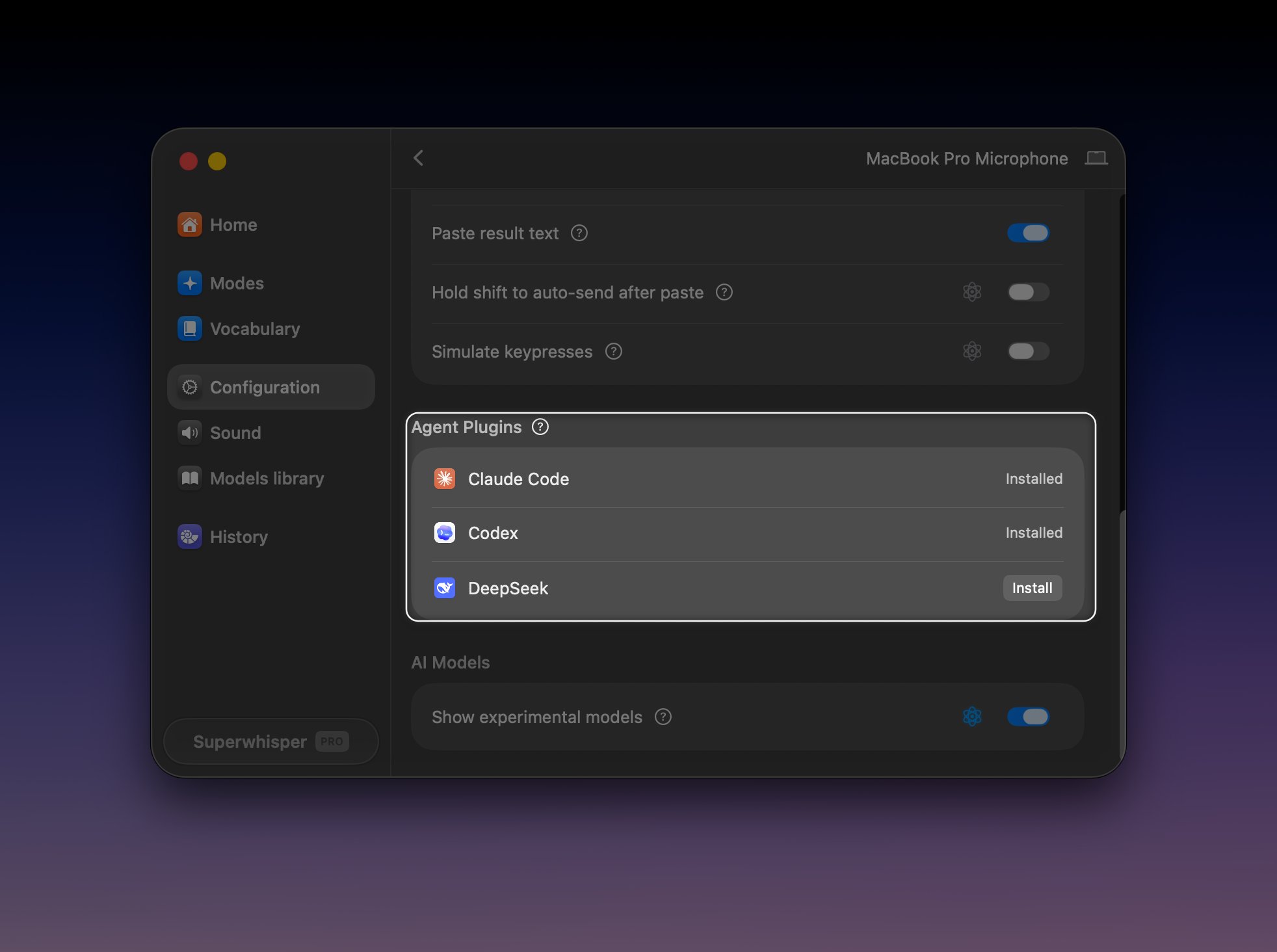 Superwhisper installs a small plugin into each agent's own configuration.
## Install manually
Every integration can also be installed from the terminal. Restart the agent afterward; plugins load when the agent starts.
```bash theme={null}
curl -fsSL https://superwhisper.com/install-claude-code.sh | bash
```
Or through Claude Code's plugin system:
```bash theme={null}
claude plugin marketplace add superultrainc/superwhisper-claude-code
claude plugin install superwhisper
```
Installs the `superwhisper` plugin and a `superwhisper` MCP server. Source: [superultrainc/superwhisper-claude-code](https://github.com/superultrainc/superwhisper-claude-code).
```bash theme={null}
curl -fsSL https://superwhisper.com/install-opencode.sh | bash
```
Installs the `@superwhisper/opencode` plugin globally in `~/.config/opencode`. Requires the `opencode` CLI. Source: [superultrainc/opencode-superwhisper](https://github.com/superultrainc/opencode-superwhisper).
```bash theme={null}
curl -fsSL https://superwhisper.com/install-codex.sh | bash
```
Or through Codex's plugin system:
```bash theme={null}
codex plugin marketplace add superultrainc/superwhisper-codex
codex plugin add superwhisper@superwhisper
```
Source: [superultrainc/superwhisper-codex](https://github.com/superultrainc/superwhisper-codex).
```bash theme={null}
pi install npm:@superwhisper/pi
```
Installs the Superwhisper extension from npm. Source: [superultrainc/pi-superwhisper](https://github.com/superultrainc/pi-superwhisper).
```bash theme={null}
curl -fsSL https://superwhisper.com/install-grok.sh | bash
```
Installs Superwhisper hooks into the Grok CLI. Requires Grok CLI 0.2.112 or newer. Source: [superultrainc/superwhisper-grok](https://github.com/superultrainc/superwhisper-grok).
```bash theme={null}
curl -fsSL https://superwhisper.com/install-deep-seek.sh | bash
```
Installs the Superwhisper plugin into the DeepSeek Harness (`dsh`) web profile. Source: [superultrainc/superwhisper-dsh](https://github.com/superultrainc/superwhisper-dsh).
Cursor is supported through the [Agent Plugins pane](#set-up) only; it has no manual install command yet.
## Manage or remove the plugin
The plugin lives in each agent's own settings, so you manage it from the agent's side:
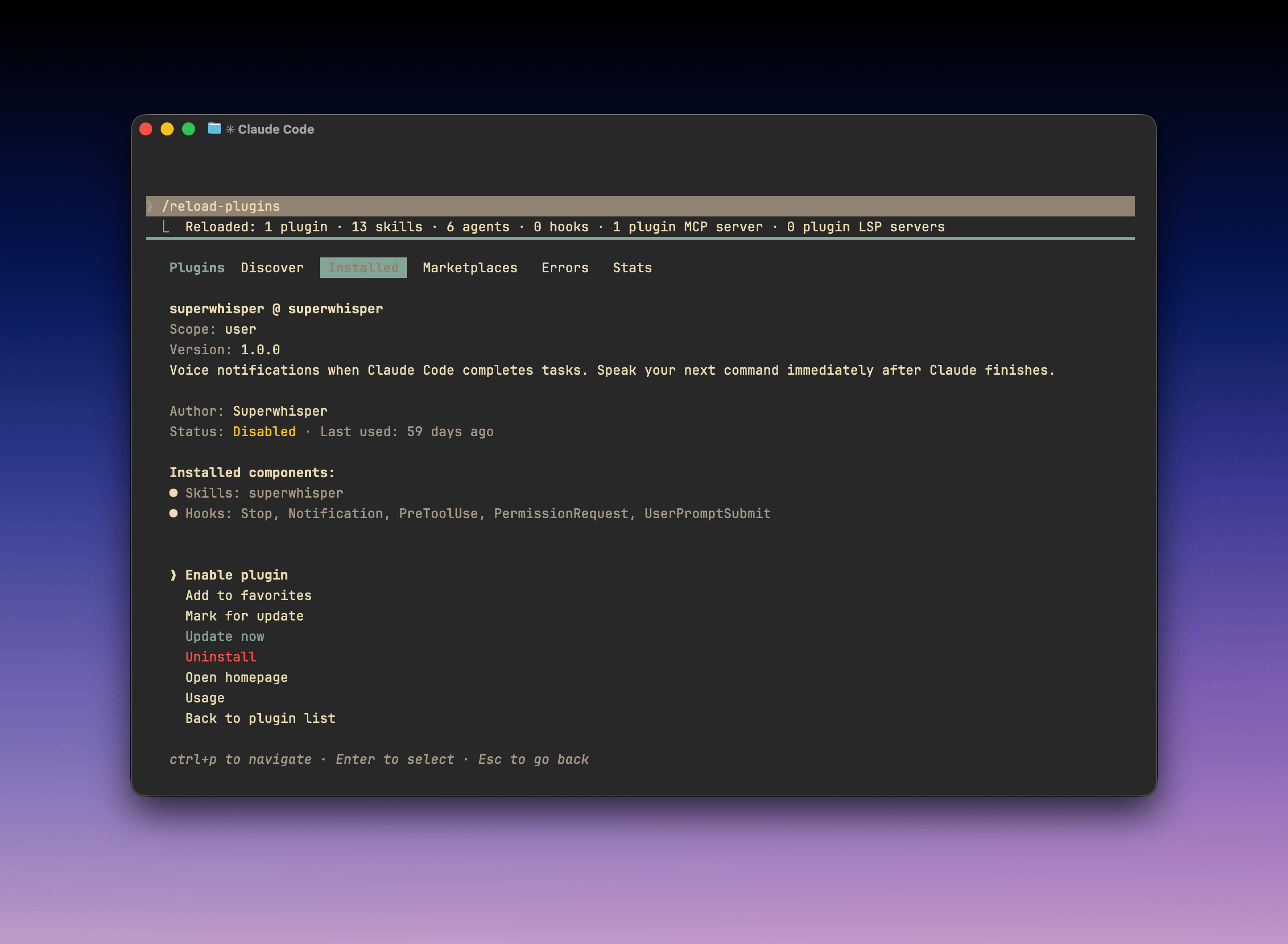
* **Claude Code**: run `/plugin` inside Claude Code to enable, disable, or uninstall the plugin. It's listed as `superwhisper@superwhisper`.
Superwhisper installs a small plugin into each agent's own configuration.
## Install manually
Every integration can also be installed from the terminal. Restart the agent afterward; plugins load when the agent starts.
```bash theme={null}
curl -fsSL https://superwhisper.com/install-claude-code.sh | bash
```
Or through Claude Code's plugin system:
```bash theme={null}
claude plugin marketplace add superultrainc/superwhisper-claude-code
claude plugin install superwhisper
```
Installs the `superwhisper` plugin and a `superwhisper` MCP server. Source: [superultrainc/superwhisper-claude-code](https://github.com/superultrainc/superwhisper-claude-code).
```bash theme={null}
curl -fsSL https://superwhisper.com/install-opencode.sh | bash
```
Installs the `@superwhisper/opencode` plugin globally in `~/.config/opencode`. Requires the `opencode` CLI. Source: [superultrainc/opencode-superwhisper](https://github.com/superultrainc/opencode-superwhisper).
```bash theme={null}
curl -fsSL https://superwhisper.com/install-codex.sh | bash
```
Or through Codex's plugin system:
```bash theme={null}
codex plugin marketplace add superultrainc/superwhisper-codex
codex plugin add superwhisper@superwhisper
```
Source: [superultrainc/superwhisper-codex](https://github.com/superultrainc/superwhisper-codex).
```bash theme={null}
pi install npm:@superwhisper/pi
```
Installs the Superwhisper extension from npm. Source: [superultrainc/pi-superwhisper](https://github.com/superultrainc/pi-superwhisper).
```bash theme={null}
curl -fsSL https://superwhisper.com/install-grok.sh | bash
```
Installs Superwhisper hooks into the Grok CLI. Requires Grok CLI 0.2.112 or newer. Source: [superultrainc/superwhisper-grok](https://github.com/superultrainc/superwhisper-grok).
```bash theme={null}
curl -fsSL https://superwhisper.com/install-deep-seek.sh | bash
```
Installs the Superwhisper plugin into the DeepSeek Harness (`dsh`) web profile. Source: [superultrainc/superwhisper-dsh](https://github.com/superultrainc/superwhisper-dsh).
Cursor is supported through the [Agent Plugins pane](#set-up) only; it has no manual install command yet.
## Manage or remove the plugin
The plugin lives in each agent's own settings, so you manage it from the agent's side:
* **Claude Code**: run `/plugin` inside Claude Code to enable, disable, or uninstall the plugin. It's listed as `superwhisper@superwhisper`.
 * **OpenCode**: remove `@superwhisper/opencode` from `~/.config/opencode/opencode.json`.
Disabling or removing the plugin only turns off the integration. The Superwhisper app itself is unaffected, and re-connecting reinstalls the plugin.
## Troubleshooting
* **The agent doesn't trigger Superwhisper**: restart the agent after installing the plugin. Plugins load when the agent starts.
* **Claude Code doesn't show the plugin**: run `/plugin` in Claude Code and check whether `superwhisper@superwhisper` is installed and enabled.
* **Still stuck**: email [support@superwhisper.com](mailto:support@superwhisper.com) with the agent name and its version.
* **OpenCode**: remove `@superwhisper/opencode` from `~/.config/opencode/opencode.json`.
Disabling or removing the plugin only turns off the integration. The Superwhisper app itself is unaffected, and re-connecting reinstalls the plugin.
## Troubleshooting
* **The agent doesn't trigger Superwhisper**: restart the agent after installing the plugin. Plugins load when the agent starts.
* **Claude Code doesn't show the plugin**: run `/plugin` in Claude Code and check whether `superwhisper@superwhisper` is installed and enabled.
* **Still stuck**: email [support@superwhisper.com](mailto:support@superwhisper.com) with the agent name and its version.