> ## Documentation Index
> Fetch the complete documentation index at: https://superwhisper.com/docs/llms.txt
> Use this file to discover all available pages before exploring further.
# Private and offline meetings
> Record, transcribe, and summarize meetings with nothing leaving your Mac. See which meeting data goes where with local models, cloud models, and share links.
With a local voice model and a local language model, the audio, transcript, and summary never leave your Mac, and meetings work offline.
## Set up local meetings
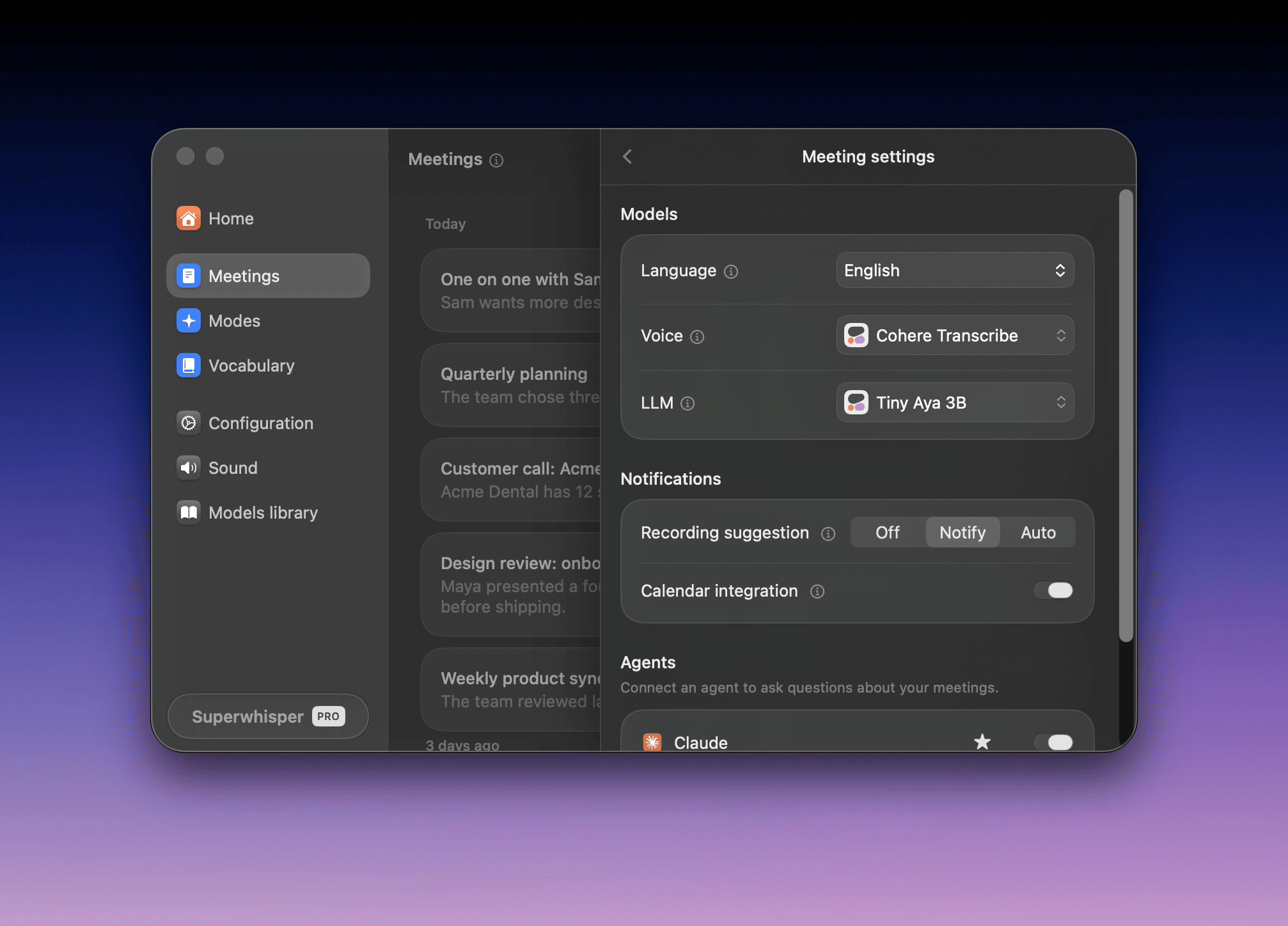
1. In the **Meetings** tab, click the gear
2. Set **Voice** to **Cohere Transcribe**, or **Parakeet** for speed over accuracy
3. Set **LLM** to **Tiny Aya 3B** or **Qwen 3.5 2B**
4. Wait for the models to download
 | Model | Role | Size | Best for |
| - | - | - | - |
| Cohere Transcribe | Voice | 1.3 GB | The most accurate local transcription, in 14 languages. Needs Apple silicon |
| Tiny Aya 3B | LLM | 2.1 GB | Summaries in 60+ languages |
| Qwen 3.5 2B | LLM | 1.3 GB | Faster summaries on smaller Macs |
Local summaries are shorter than cloud summaries. See [local summary tips](/docs/meetings/summaries#local-summaries-are-short-or-miss-the-format).
## Where meeting data goes
Speaker separation, calendar data, and saved meetings always stay on your Mac. The models decide the rest:
| Data | Local models | Cloud models |
| - | - | - |
| Audio | Stays on your Mac | Sent to the voice model provider |
| Transcript and private notes | Stay on your Mac | Sent to the language model provider for the summary |
Mix them to suit you. A local voice model with a cloud LLM keeps audio on your Mac and sends only text.
Superwhisper's cloud providers don't keep or train on your data. See [Cloud models: privacy commitments](/docs/security/sensitive-data#cloud-models-privacy-commitments).
Data also leaves your Mac when you:
* **Create a share link**: uploads the summary text, title, and date for 30 days. See [Share a link](/docs/meetings/share#share-a-link)
* **Connect an agent**: the agent's provider receives what it reads. See [Ask an agent](/docs/meetings/share#ask-an-agent-about-your-meetings)
* **Drag or copy a summary**: the receiving app's terms apply
## Recording consent
Many places require consent from everyone on a call before you record it. No bot announces Superwhisper, so tell the other attendees.
## Enterprise controls
Admins set these in the dashboard. See [Configuration & Models](/docs/enterprise/configuration).
* **Allow cloud AI models**: off limits meetings to local models and your organization's custom models
* **Allow system audio recording**: off turns Meetings off
* **Meeting sharing**: public links, sign-in links, or no links
* **Recording retention**: deletes old meetings from members' Macs, like dictations
This documentation is built and hosted on [Mintlify](https://mintlify.com), a developer documentation platform.
| Model | Role | Size | Best for |
| - | - | - | - |
| Cohere Transcribe | Voice | 1.3 GB | The most accurate local transcription, in 14 languages. Needs Apple silicon |
| Tiny Aya 3B | LLM | 2.1 GB | Summaries in 60+ languages |
| Qwen 3.5 2B | LLM | 1.3 GB | Faster summaries on smaller Macs |
Local summaries are shorter than cloud summaries. See [local summary tips](/docs/meetings/summaries#local-summaries-are-short-or-miss-the-format).
## Where meeting data goes
Speaker separation, calendar data, and saved meetings always stay on your Mac. The models decide the rest:
| Data | Local models | Cloud models |
| - | - | - |
| Audio | Stays on your Mac | Sent to the voice model provider |
| Transcript and private notes | Stay on your Mac | Sent to the language model provider for the summary |
Mix them to suit you. A local voice model with a cloud LLM keeps audio on your Mac and sends only text.
Superwhisper's cloud providers don't keep or train on your data. See [Cloud models: privacy commitments](/docs/security/sensitive-data#cloud-models-privacy-commitments).
Data also leaves your Mac when you:
* **Create a share link**: uploads the summary text, title, and date for 30 days. See [Share a link](/docs/meetings/share#share-a-link)
* **Connect an agent**: the agent's provider receives what it reads. See [Ask an agent](/docs/meetings/share#ask-an-agent-about-your-meetings)
* **Drag or copy a summary**: the receiving app's terms apply
## Recording consent
Many places require consent from everyone on a call before you record it. No bot announces Superwhisper, so tell the other attendees.
## Enterprise controls
Admins set these in the dashboard. See [Configuration & Models](/docs/enterprise/configuration).
* **Allow cloud AI models**: off limits meetings to local models and your organization's custom models
* **Allow system audio recording**: off turns Meetings off
* **Meeting sharing**: public links, sign-in links, or no links
* **Recording retention**: deletes old meetings from members' Macs, like dictations
This documentation is built and hosted on [Mintlify](https://mintlify.com), a developer documentation platform.