> ## Documentation Index
> Fetch the complete documentation index at: https://superwhisper.com/docs/llms.txt
> Use this file to discover all available pages before exploring further.
# Summaries and templates
> See how Superwhisper writes meeting summaries with decisions and action items. Switch templates, edit the built-in instructions, or write your own.
When a recording ends, the **LLM** from [Meeting settings](/docs/meetings/overview#meeting-settings) reads the transcript and your private notes and writes the summary. It's written in the main language of the meeting.
 ## What a summary contains
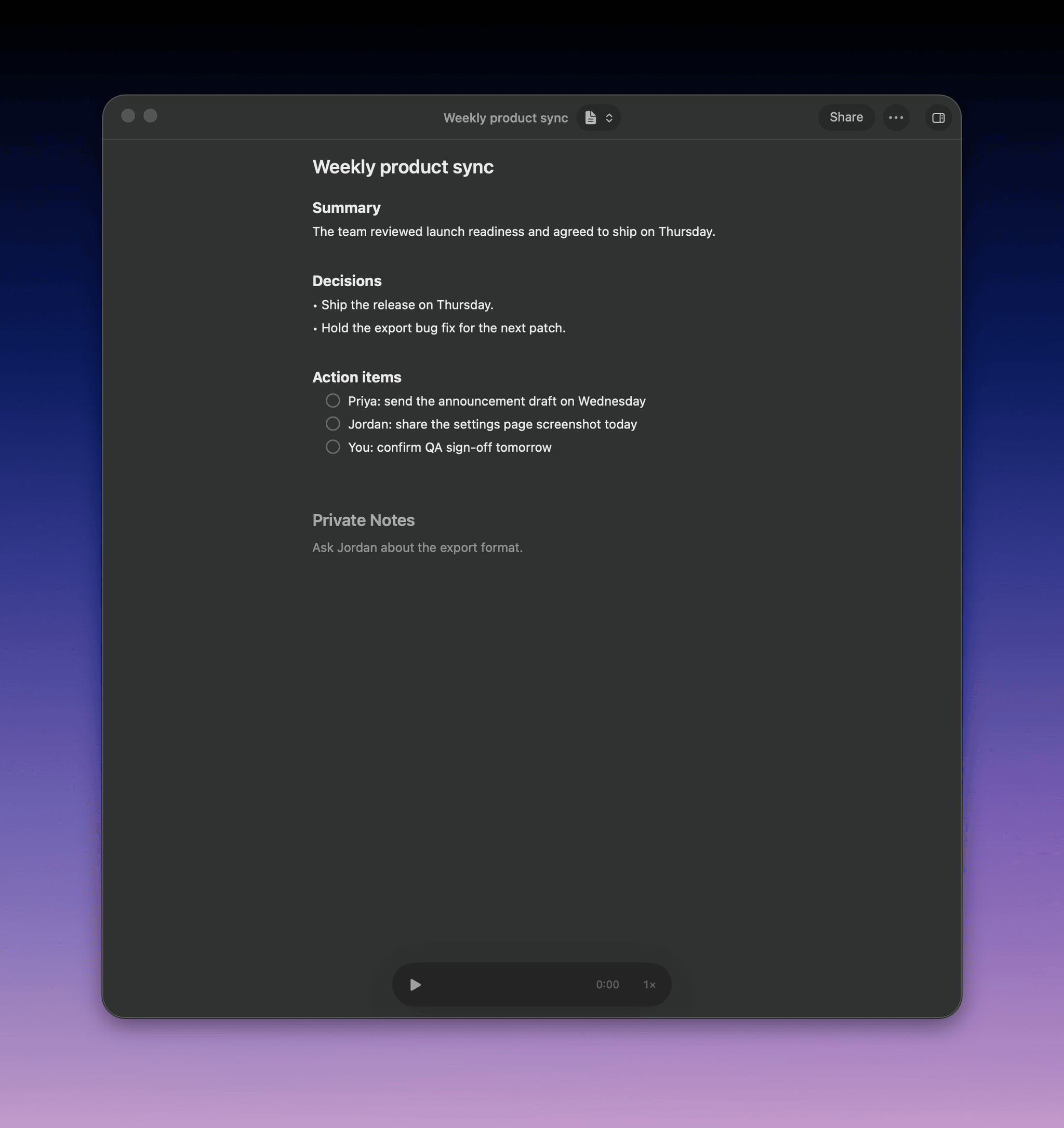
The built-in **Summary** template writes notes for someone who missed the meeting:
* **Title and overview**: three to five sentences
* **Topics**: a section for each, with facts and the reasons behind them
* **Decisions**: what was agreed, and why
* **Open questions**: what is still unresolved
* **Action items**: checkboxes with an owner, like `- [ ] @Sam send the revised quote`
Edit the title and summary in the meeting window. Click a checkbox to mark an action item done.
[Private notes](/docs/meetings/record#private-notes) shape the summary. Use them to correct a name, add context, or say what matters most.
## Templates
A template is the instructions the language model follows. It doesn't change the models or recording settings.
| Template | What it writes |
| - | - |
| **Summary** | What was discussed, decisions, and action items. The default |
| **Email follow up** | A ready-to-send email to the attendees with a recap and next steps |
| **Action items** | Decisions and commitments, with a short recap |
### Switch templates
Click the template button in the meeting toolbar and pick a template. To choose one before the meeting, use the arrow next to **Record** in the [meeting prompt](/docs/meetings/record#start-a-recording).
Each meeting keeps every summary you generate, so switching back is instant. Choose **Regenerate** to rewrite the current one, for example after you add notes or rename speakers.
### Write your own template
1. Click the template button and choose **New template**
2. Name it
3. Write the instructions: what to include, the structure, the tone, and the audience
4. Save it, then pick it in the toolbar
For example, a **client call** template that lists requirements, budget, objections, and next steps, or a **stand-up** template with what each person did, will do next, and is blocked on. See [prompting tips](/docs/modes/custom#prompting-tips).
### Manage templates
Choose **All templates** in the template menu.
## What a summary contains
The built-in **Summary** template writes notes for someone who missed the meeting:
* **Title and overview**: three to five sentences
* **Topics**: a section for each, with facts and the reasons behind them
* **Decisions**: what was agreed, and why
* **Open questions**: what is still unresolved
* **Action items**: checkboxes with an owner, like `- [ ] @Sam send the revised quote`
Edit the title and summary in the meeting window. Click a checkbox to mark an action item done.
[Private notes](/docs/meetings/record#private-notes) shape the summary. Use them to correct a name, add context, or say what matters most.
## Templates
A template is the instructions the language model follows. It doesn't change the models or recording settings.
| Template | What it writes |
| - | - |
| **Summary** | What was discussed, decisions, and action items. The default |
| **Email follow up** | A ready-to-send email to the attendees with a recap and next steps |
| **Action items** | Decisions and commitments, with a short recap |
### Switch templates
Click the template button in the meeting toolbar and pick a template. To choose one before the meeting, use the arrow next to **Record** in the [meeting prompt](/docs/meetings/record#start-a-recording).
Each meeting keeps every summary you generate, so switching back is instant. Choose **Regenerate** to rewrite the current one, for example after you add notes or rename speakers.
### Write your own template
1. Click the template button and choose **New template**
2. Name it
3. Write the instructions: what to include, the structure, the tone, and the audience
4. Save it, then pick it in the toolbar
For example, a **client call** template that lists requirements, budget, objections, and next steps, or a **stand-up** template with what each person did, will do next, and is blocked on. See [prompting tips](/docs/modes/custom#prompting-tips).
### Manage templates
Choose **All templates** in the template menu.
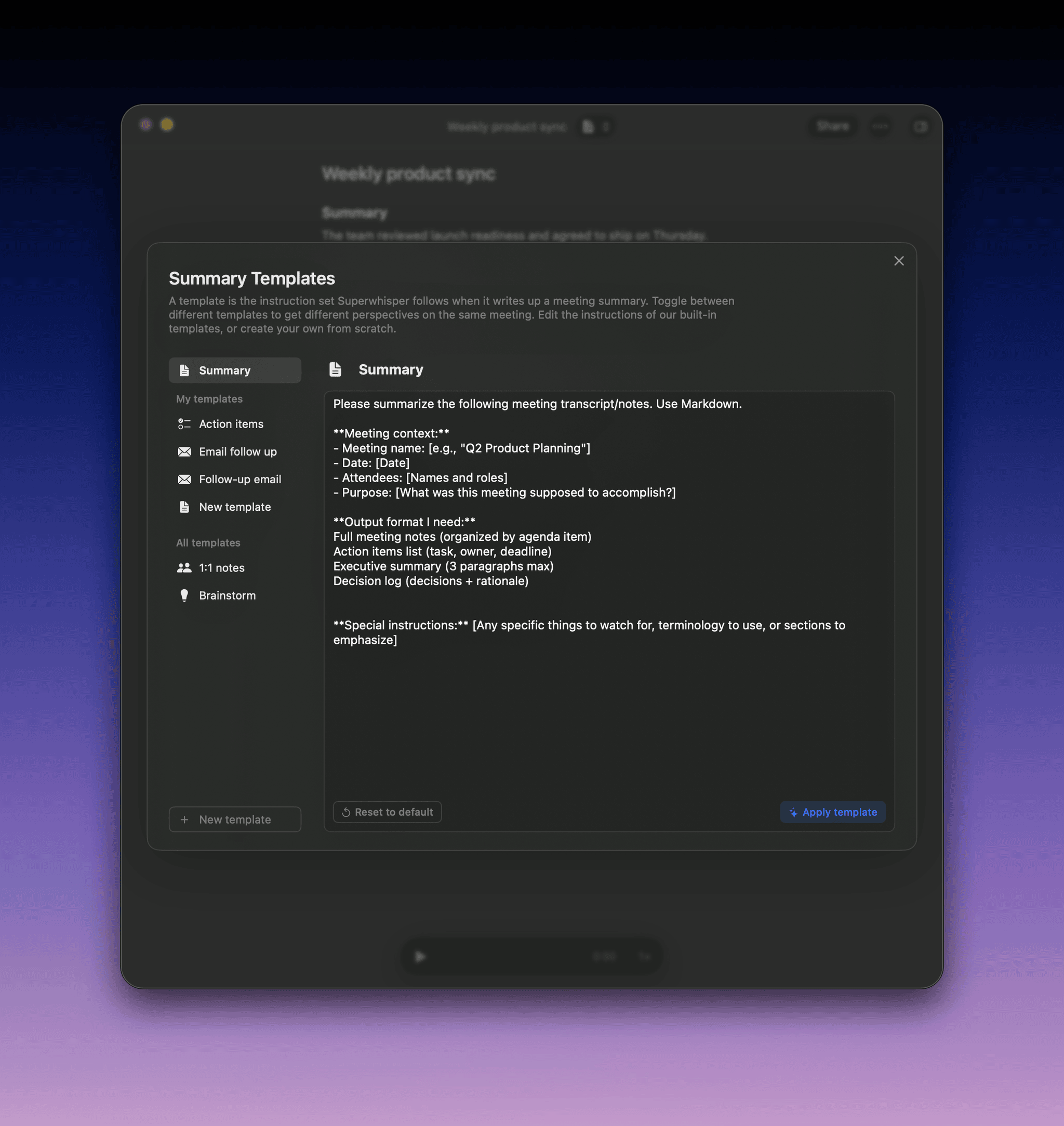 * **Edit**: change any template's instructions, including **Summary**. Unedited built-in templates improve with app updates
* **Star**: show a template in the toolbar menu
* **Rename** or **delete**: your own templates
Custom meeting modes from before Superwhisper 3.0 were copied into templates. Find them in **All templates**.
## Summary problems
### "Not enough was said in this meeting to summarize."
The meeting has fewer than about 25 words and no private notes. If the other side of the call is missing, see [The other side of the call is missing](/docs/meetings/record#the-other-side-of-the-call-is-missing).
### The summary shows the raw transcript
The language model failed, so Superwhisper saved the transcript instead. Check your connection for cloud models, or that a local model finished downloading, then choose **Regenerate**. See [LLM processing errors](/docs/common-issues/llm-processing-error).
### Names in the summary are wrong
[Rename the speakers](/docs/meetings/record#speaker-names), then choose **Regenerate**.
### Local summaries are short or miss the format
Small local models follow long instructions less closely. Keep custom templates short. For long or multilingual meetings, **Tiny Aya 3B** does better than **Qwen 3.5 2B**.
This documentation is built and hosted on [Mintlify](https://mintlify.com), a developer documentation platform.
* **Edit**: change any template's instructions, including **Summary**. Unedited built-in templates improve with app updates
* **Star**: show a template in the toolbar menu
* **Rename** or **delete**: your own templates
Custom meeting modes from before Superwhisper 3.0 were copied into templates. Find them in **All templates**.
## Summary problems
### "Not enough was said in this meeting to summarize."
The meeting has fewer than about 25 words and no private notes. If the other side of the call is missing, see [The other side of the call is missing](/docs/meetings/record#the-other-side-of-the-call-is-missing).
### The summary shows the raw transcript
The language model failed, so Superwhisper saved the transcript instead. Check your connection for cloud models, or that a local model finished downloading, then choose **Regenerate**. See [LLM processing errors](/docs/common-issues/llm-processing-error).
### Names in the summary are wrong
[Rename the speakers](/docs/meetings/record#speaker-names), then choose **Regenerate**.
### Local summaries are short or miss the format
Small local models follow long instructions less closely. Keep custom templates short. For long or multilingual meetings, **Tiny Aya 3B** does better than **Qwen 3.5 2B**.
This documentation is built and hosted on [Mintlify](https://mintlify.com), a developer documentation platform.